
How to Install Krira TV on Android Smart TV (Step-by-Step Guide)
Krira TV is not available on the Google Play Store. However, you can easily install it on your Android Smart TV or Android TV Box by sideloading the APK file.
This guide will show you the simplest and safest ways to install Krira TV on your Android Smart TV.
Prepare Your Device First
Make sure your device is ready before installing Krira TV:
- Android Smart TV / TV Box
- Stable Wi-Fi connection
- Downloaded APK file
- Enough storage space
Method 1: Using Downloader App
This is the most popular and convenient method for Android TV.
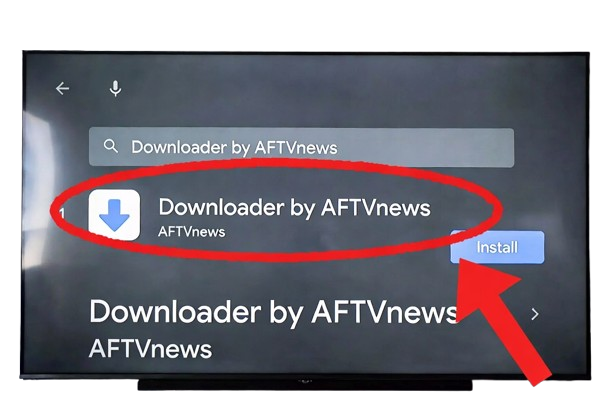
- Install Downloader App Open the Google Play Store on your Android TV. Search for “Downloader by AFTVnews” and install it.
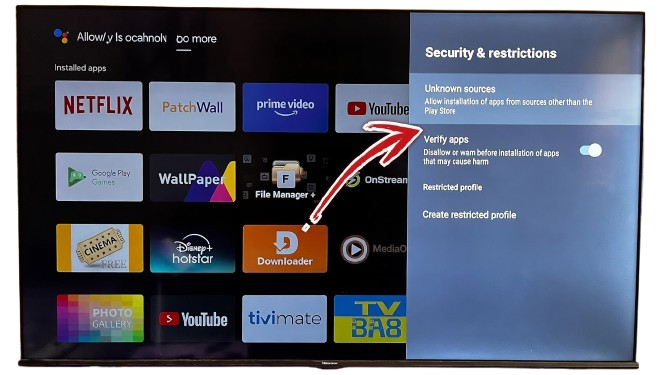
- Enable Unknown Sources Go to Settings > Apps > Security & Restrictions > Unknown Sources. Find Downloader and turn on “Allow from this source”.
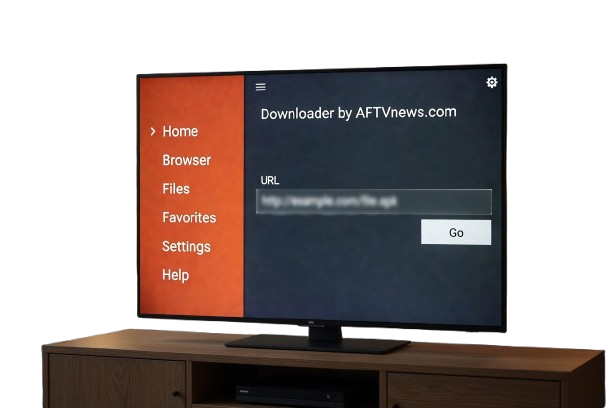
- Download Krira TV APK Open the Downloader app. Enter the download link from this page and press Go. Wait for the Krira TV APK to finish downloading.
- Install the App Once the download is complete, click Install. If a warning appears, select Install Anyway.
- Launch Krira TV After installation, open the app from your app list. Grant the necessary permissions and start watching live sports.
Method 2: Using USB Drive (Offline Method)
- Download the Krira TV APK file on your phone or computer.
- Copy the APK file to a USB Pendrive.
- Plug the USB into your Android TV.
- Open the File Manager app on your TV (or install “File Commander” from Play Store).
- Go to the USB folder, select the APK file, and tap Install.
- Wait for the installation to complete and open the app.
Method 3: Using File Transfer Apps (Phone to TV)
- Download Krira TV APK on your Android phone.
- Connect both your phone and TV to the same Wi-Fi.
- Install Send Anywhere or Xender on both devices.
- Send the APK file from your phone to the TV.
- On the TV, open the received file and install it.
Ready to watch on your big screen?
Click the button below to download Krira TV APK and enjoy live sports on your Android Smart TV.